
DNS Triage Cheatsheet
Written by Michael Allen || Reviewed by Dale Hobbs
This blog is part of Offensive Tooling Cheatsheets: An Infosec Survival Guide Resource. You can learn more and find all of the cheatsheets HERE: https://www.blackhillsinfosec.com/offensive-tooling-cheatsheets/
DNS Triage Cheatsheet: PRINT-FRIENDLY PDF
Find the tool here: https://github.com/Wh1t3Rh1n0/dns-triage
What is it?
Fast, actionable, tech reconnaissance for attackers.
DNS Triage is a reconnaissance tool that finds information about an organization’s infrastructure, software, and third-party services as fast as possible. The goal of DNS Triage is not to exhaustively find every technology asset that exists on the internet. The goal is to find the most commonly abused items of interest for real attackers.
How does it work?
DNS Triage uses a combination of DNS queries and web requests to collect interesting information. Specifically:
- It gathers TXT, MX, and NS records of the target domain.
- It queries DNS records of commonly abused Microsoft services and checks whether they are hosted in Microsoft’s cloud or on-premises.
- It resolves a hand-picked selection of very common subdomains on the target domain, where abusable services and infrastructure are often found.
- It makes targeted DNS and/or HTTP queries of third-party services to determine which services are used by the organization.
- Whenever possible, it displays additional details that may be useful for abusing the resources that have been discovered.
How do I install it?
- Download and extract the ZIP archive from the project repository at https://github.com/Wh1t3Rh1n0/dns-triage or run the following command to download DNS Triage with git:
git clone https://github.com/Wh1t3Rh1n0/dns-triage - Open a terminal window in the folder where you downloaded/extracted the DNS Triage files, and run the following command to install Python libraries used by DNS Triage:
python3 -m pip install -r requirements.txt How do I use it?
The recommended way to launch DNS Triage is simply to run dns-triage.py command followed by the domain name that you want to target. An example command targeting example.com is shown below.
python3 dns-triage.py example.com Tip: Help documentation describing other additional options can be shown by running DNS Triage without specifying any other arguments.
What does all the output mean?
DNS Triage can sometimes generate a lot of output. Here are some examples of the output it displays and key information you should look for.
TXT Records
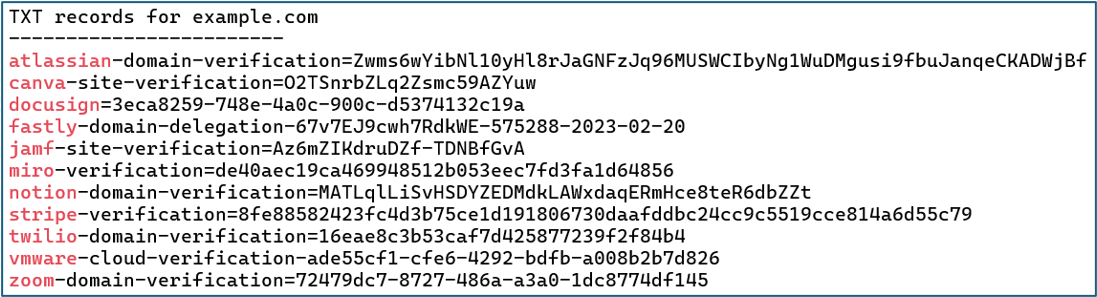
Clues in TXT records often reveal technology products and services used by the organization. This information can be very useful, both for social engineering and for technical attacks.
MX Records
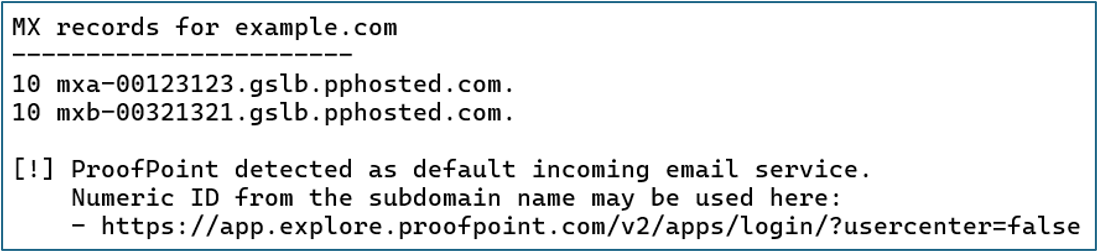
May indicate the organization’s email defenses. In this case, ProofPoint has been detected.
Microsoft Services
On-premises and cloud-hosted Microsoft services are frequently affected by known vulnerabilities and exploitation paths. In the example below, a Microsoft Exchange Smart Host has been detected, which is often vulnerable to email spoofing attacks. The link to a relevant blog, with exploitation details, is included in the output.

Interesting Subdomains
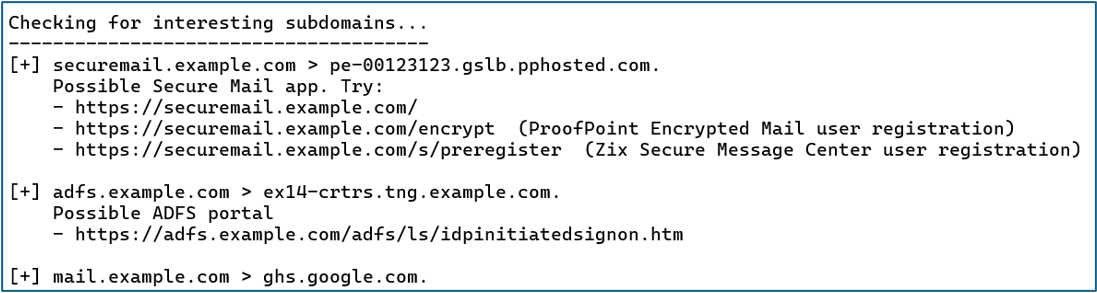
Subdomains often indicate the presence of abusable infrastructure. In the example below, the securemail subdomain was detected, and DNS Triage recommends URLs that the attacker should investigate to abuse this service.
Tip: Registering a new account on an organization’s own encrypted email portal and then phishing them from that account is a favorite way to bypass email filters. 😈
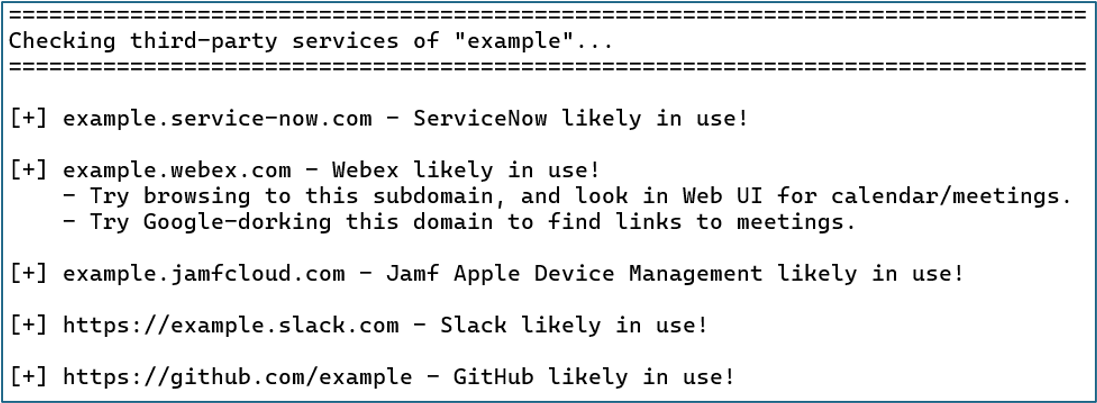
Third-Party Services
The final section of the output shows third-party services that were detected. Here, we see that the organization is using ServiceNow, Webex, Jamf, Slack, and GitHub. In addition to leveraging these services for social engineering, detecting Jamf indicates to us that at least some Apple computers are likely present in the environment. This is key information when preparing executable payloads for an attack.

Explore the Infosec Survival Guide and more… for FREE!
Get instant access to all issues of the Infosec Survival Guide, as well as content like our self-published infosec zine, PROMPT#, and exclusive Darknet Diaries comics—all available at no cost.
You can check out all current and upcoming issues here: https://www.blackhillsinfosec.com/prompt-zine/