
Swapper – A Pure Regex Match/Replace Burp Extension

Penetration Tester. Developer. Pure GNU/Linux Phone Enthusiast.

There are a thousand (rough guess) different ways in Burp Suite to swap out session token values when using something like Intruder or the Scanner. But what about the edge cases? Recently, I tested an application that used SOAP-based XML requests. The session token was only used once; each request set a new session token and invalidated the old session token, which makes using Burp Suite tools like Intruder rather difficult. (Good luck using Match and Replace for that!) And… there are extensions (which shall remain nameless) out there that specifically state they handle XML, but they don’t.
To get a valid session token to use with Burp Suite tools, I ended up writing a small Python extension (110 lines of code, but who’s counting?) that obtained a new session token for each request, allowing items like Intruder to work as intended. Cool, I was able to use it during the test, but I would like this to be repeatable. So, this blog is releasing Swapper, a regex pattern-based match/replace Burp Suite extension.
Easy to Install
Install from the Bapp Store here: https://portswigger.net/bappstore/0077e9930f0147679b6c5ddbedac52be
Or download from here: https://github.com/roidrage52/SWAPPER
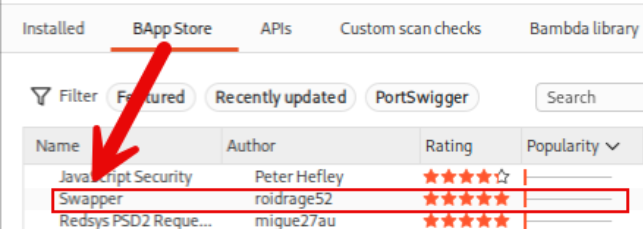
Burp Suite needs the Python environment configured. Ensure you have Jython configured for your environment (more information on that here: https://portswigger.net/burp/documentation/desktop/extend-burp/extensions/troubleshooting#you-need-to-configure-jython-or-jruby). Add the reference to the Jython JAR file in the Extensions settings.
From the Extensions settings, in the Installed tab, select add and choose Python as the extension type. Then load swapper.py. That’s all there is.
Easy(ish) to Use
In Burp Suite, select the request that returns the response that contains the value we want to use. Right-click on the request and select “Send to SWAPPER”. This will populate the headers and body in Swapper.
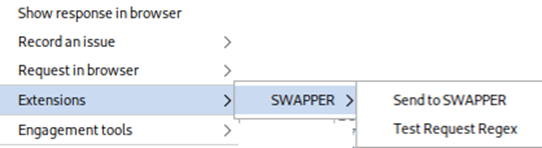
That will populate the SWAPPER configuration tile.
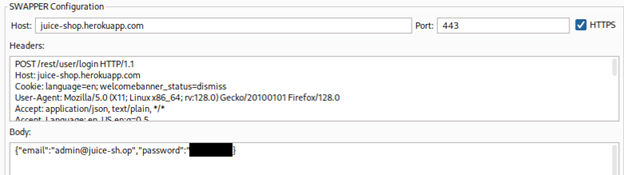
Next is setting up the regex…
Regex Pattern Matching
If I could travel back in time and talk to myself as an 8th grader, the conversation would somehow be centered around, “You will grow up and use regex everyday of your adult life.” Regex is used to match both the value obtained in the response (the session token, CSRF token) and to find applicable areas in the request to swap out. In Swapper, define your regex patterns inside the “Regex Configuration”.
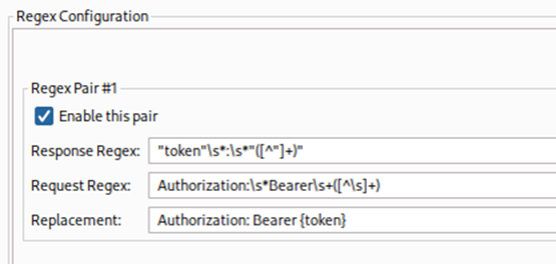
The “Response Regex” field is where you define the value to pull from the response. The pattern that is matched here will be used later in the “Replacement” field, which is the {token} field. The “Request Regex” field is where you define what values to match in the requests sent (as defined in the Extension Control settings). And lastly, the “Replacement” field is what replaces the match from the “Request Regex”. Again, use {token} to add the value obtained from the Response.
You can test your regex patterns in the extension with the “Test Token Request” feature.
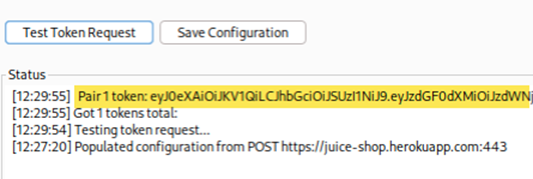
The “Response Regex” regex matched the JWT.
Handles multiple values — That is all. If you need to match a session token, a CSRF token, and anything else, you can use multiple regex pairs.
Configuration
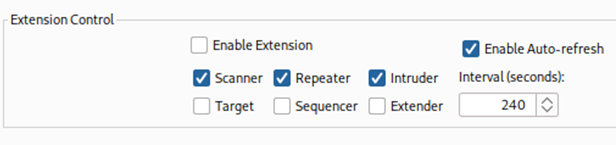
Set the modules that Swapper is needed to replace values in “Extension Control”. Swapper uses time intervals to refresh the values (default is 4 minutes). Modify the time as needed. Unchecking the “Enable Auto-refresh” box will exchange a token for each request.
Logger is Your Friend
If you’re having issues or want to verify the extension is updating the request properly, use Logger/Logger++ to verify your requests are being updated.

And that is all there is to it! If you love regex and app testing, Swapper can be worked into your testing flow for easily matching and replacing items sent in requests. Happy Hacking!
Ready to learn more?
Level up your skills with affordable classes from Antisyphon!
Available live/virtual and on-demand
