
Bypassing CSP with JSONP: Introducing JSONPeek and CSP B Gone

Jack Hyland has worked in information security ever since graduating college and has dedicated his free time to deeply learning new techniques and technologies. He now spends his time creating and contributing to open-source projects along with performing security assessments of corporations networks and infrastructure.
A Content Security Policy (CSP) is a security mechanism implemented by web servers and enforced by browsers to prevent various types of attacks, primarily cross-site scripting (XSS). CSP works by restricting resources (scripts, stylesheets, images, etc.) on a webpage to only execute if they come from approved sources. However, like most things in security, CSP isn’t bulletproof. We’ll explore one of the most common CSP weaknesses, JSONP endpoints, and introduce two new tools for security researchers to identify and exploit CSP weaknesses.
Content Security Policy Basics
A content security policy can be applied in two ways:
- HTTP header
- Content-Security-Policy: script-src *.example.com
- Meta tag returned in the HTML document
- <meta http-equiv=”Content-Security-Policy” content=”script-src *.example.com”>
Content security policies have multiple directives that allow fine-tuned control of various internet resources. In this blog, we will mainly focus on the two directives listed below as they are relevant to JSONP.
- default-src: Sets a fallback for other directives
- script-src: Controls JavaScript sources
The JSONP Trick
JSONP stands for “JSON with Padding.” The name doesn’t make much sense, but it’s a trick used by developers to load resources with arbitrary JavaScript from different origins. This trick takes advantage of the fact that a script tag’s source attribute can point to and use cross-domain resources without getting blocked by the same-origin policy.
To prove this to you, the simple HTML file below attempts to fetch google.com but is blocked by the browser. The developer console confirms the request was blocked since Google didn’t return a cross-origin resource sharing (CORS) header to relax the same origin policy (SOP).
<html>
    <script>
    	    fetch("https://google.com/ ");
    </script>
</html>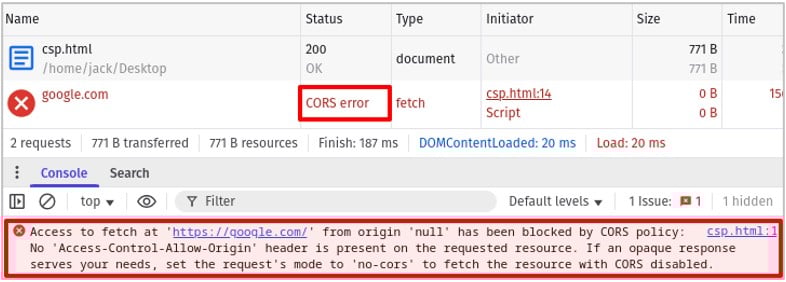
If we modify the HTML page to request google.com using the src attribute of a <script> tag, we no longer see the CORS error and the request is successful, indicated by the 200 OK HTTP response code. This is intended functionality of browsers as its common in web development to include static JavaScript files from other domains.
<html>
    <script src="https://google.com/"></script>
</html>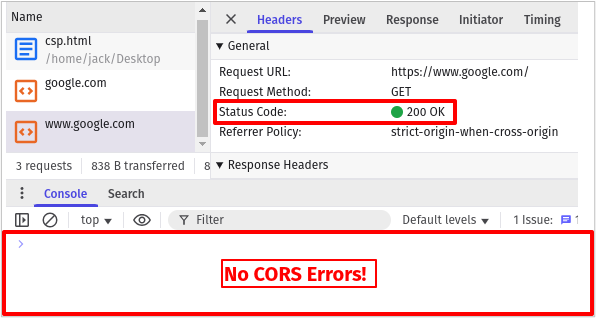
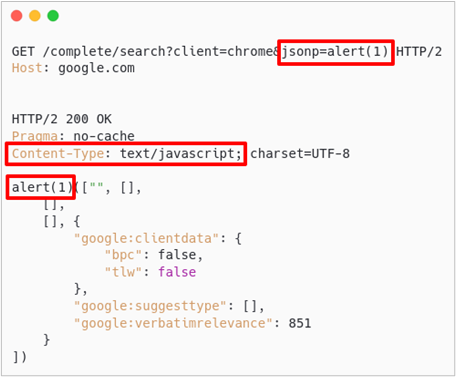
Now what if we configured a web server to accept a GET parameter that dynamically changes the JavaScript returned? This is how JSONP endpoints work. As shown below, google.com has a JSONP endpoint at /complete/search where we can modify the jsonp GET parameter to include arbitrary JavaScript. The returned content type is text/javascript which will be executed if referenced by a script tag.
How Does JSONP Bypass CSP?
A website with a strict CSP configured to only allow scripts loaded from google.com appears quite secure at first glance.
"script-src https://google.com/;"This policy prevents inline script tags from executing and doesn’t even allow JavaScript files from the same origin! However, if google.com hosts any JSONP endpoints, the CSP provides no protection against XSS. The simple HTML file below uses the CSP above. It then attempts to load a JavaScript resource from example.com, then /test.js from the current origin and finally a JSONP endpoint on google.com with an alert() payload in the jsonp parameter.
<html>
    <meta http-equiv="Content-Security-Policy" content="script-src https://google.com/;">
    <script src="https://example.com/"></script>
    <script src="/test.js"></script>
    <script src="https://google.com/complete/search?client=chrome&jsonp=alert(`CSP-BYPASS`)"></script>
</html>
As shown below, the first two resource requests were blocked by the strong CSP but the third succeeded and allowed us to execute arbitrary JavaScript.
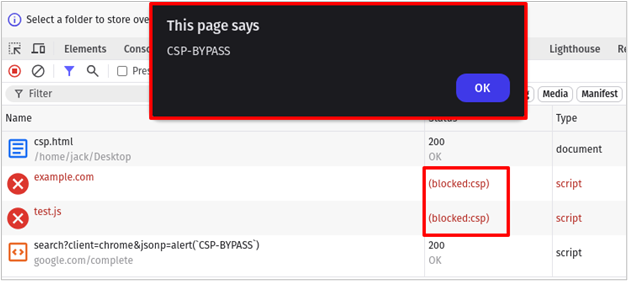
When a website’s CSP allows scripts from a domain that hosts JSONP endpoints, those endpoints become vectors for CSP bypasses.
Detecting JSONP Endpoints with JSONPeek
Hopefully you now have an understanding of how JSONP endpoints can be leveraged to bypass a website’s content security policy and achieve cross-site scripting. But how exactly are you supposed to find these endpoints?
There is no perfect way to fingerprint these endpoints, unfortunately, but they do often use unique parameter names1 which we can look for in HTTP requests. Doing this manually is tedious so I wrote a simple Firefox extension called JSONPeek2 to observe requests made by a page and looks for ones that contain JSONP callback parameters.
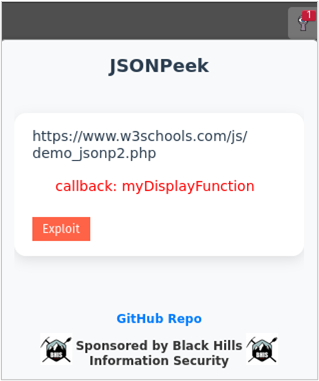
To verify whether the suspected endpoint is using JSONP, there is an exploit button in the extension that submits the URL to a special webpage. I set up some fancy hooking3 such that the page will check the submitted URL using multiple payloads, attempt to trigger the alert() function, and update the results in a table.
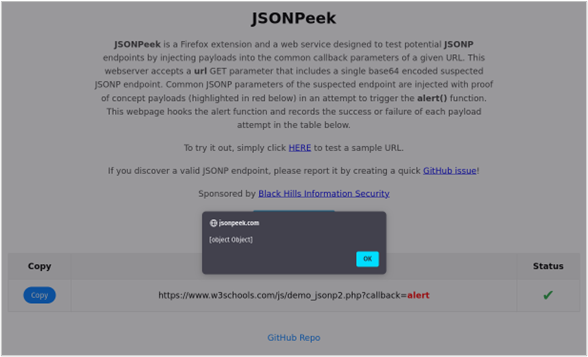
Once you’ve installed the JSONPeek extension,4 you can try it out by browsing to the URL below, opening the JSONPeek extension and clicking the exploit button.
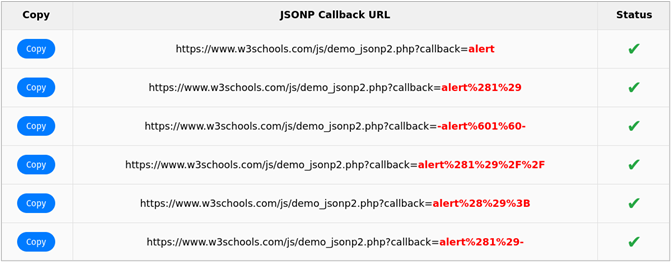
The results table should have green check marks next to each of the tested callback URLs. Only a single green check mark is required for a successful bypass. Congrats, you discovered a JSONP endpoint!
Crowdsourcing JSONP Endpoints
JSONP endpoints can be anywhere on a website, which makes them difficult to find. To solve this problem, I used BigQuery5 to search the Internet Archive6 for requests that include potential JSONP parameters using the following GoogleSQL script:
SELECT
  REGEXP_EXTRACT(req_host, r'([^\.]+\.[^\.]+)$') as req_domain,
  MAX(url) as url,
FROM
  `httparchive.summary_requests.2024_10_01_desktop` requests
WHERE
  type IN ('script', 'json', 'html')
AND
  REGEXP_CONTAINS(url, r'callback=|jsonpCallback=|jsonp=|callback_func=|func=|handler=|jsonp_handler=|cbfn=|onload=|j=|oncomplete=')
GROUP BY req_domain
The query returned over 10,000 results, which needed to be individually tested for false positives. I won’t go into exactly how I did that, as it could be a blog on its own, but it involved multiple Python scripts and creating a testing harness with the alert() function hooked in a headless Chrome instance. The results of this process filtered down the 10,000 endpoints to just over 2,000 true positives. I output the results to a dataset7 and combined it with the one managed by Renniepak.8
Automating CSP Bypasses with CSP B Gone
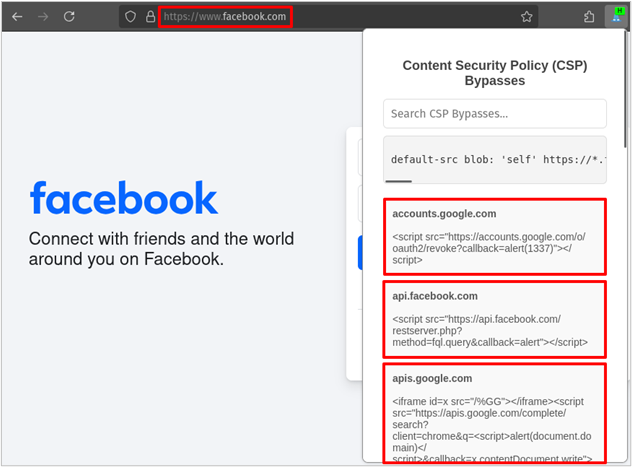
Now that we had a large dataset of CSP bypasses, I wanted a browser extension to automatically tell me when a website has a vulnerable CSP and how to bypass it. To accomplish this, I created CSP B Gone,9 a Firefox extension powered by a comprehensive dataset of JSONP endpoints. This extension automatically analyzes the content security policy of your current site, identifies if any bypasses exist with the database, and generates ready-to-use proof-of-concept payloads.
The image below shows CSP B Gone in action, providing proof-of-concept payloads to bypass the content security policy on facebook.com. Simply copy the payload and insert it anywhere you have found an XSS vulnerability.
Closing Thoughts
Hopefully this blog helped shed some light on what JSONP is, how it’s used, and how it is often misused. Using the two extensions presented, JSONPeek and CSP B Gone, you should be able to passively scan websites for JSONP endpoints and discover CSP bypasses. This is far from the only way CSP can be bypassed, but it is one of the most effective methods.
In closing, I’d like to thank Renniepak,10 creator of cspbypass.com, whose work inspired this research. Their willingness to share insights and answer my questions was invaluable.
Footnotes
- https://github.com/ACK-J/JSONPeek/blob/c4d1f22aad47aee1b87581f207080d41354584f0/popup.js#L7-L10 ↩︎
- https://addons.mozilla.org/en-US/firefox/addon/jsonpeek/ ↩︎
- https://github.com/ACK-J/JSONPeek/blob/ ↩︎
- https://addons.mozilla.org/en-US/firefox/addon/jsonpeek/ ↩︎
- https://cloud.google.com/bigquery ↩︎
- https://archive.org/ ↩︎
- https://github.com/ACK-J/CSP-B-Gone/blob/main/data.tsv ↩︎
- https://github.com/renniepak/CSPBypass/blob/main/data.tsv ↩︎
- https://addons.mozilla.org/en-US/firefox/addon/csp-b-gone/ ↩︎
- https://github.com/renniepak/ ↩︎
Ready to learn more?
Level up your skills with affordable classes from Antisyphon!
Pay-Forward-What-You-Can Training
Available live/virtual and on-demand
